
USE CASES / Insurance claims AI form filler
Fill Insurance Forms Faster and Without Stress
Simplicity AI helps individuals, businesses, and insurance professionals complete claim forms accurately in minutes.
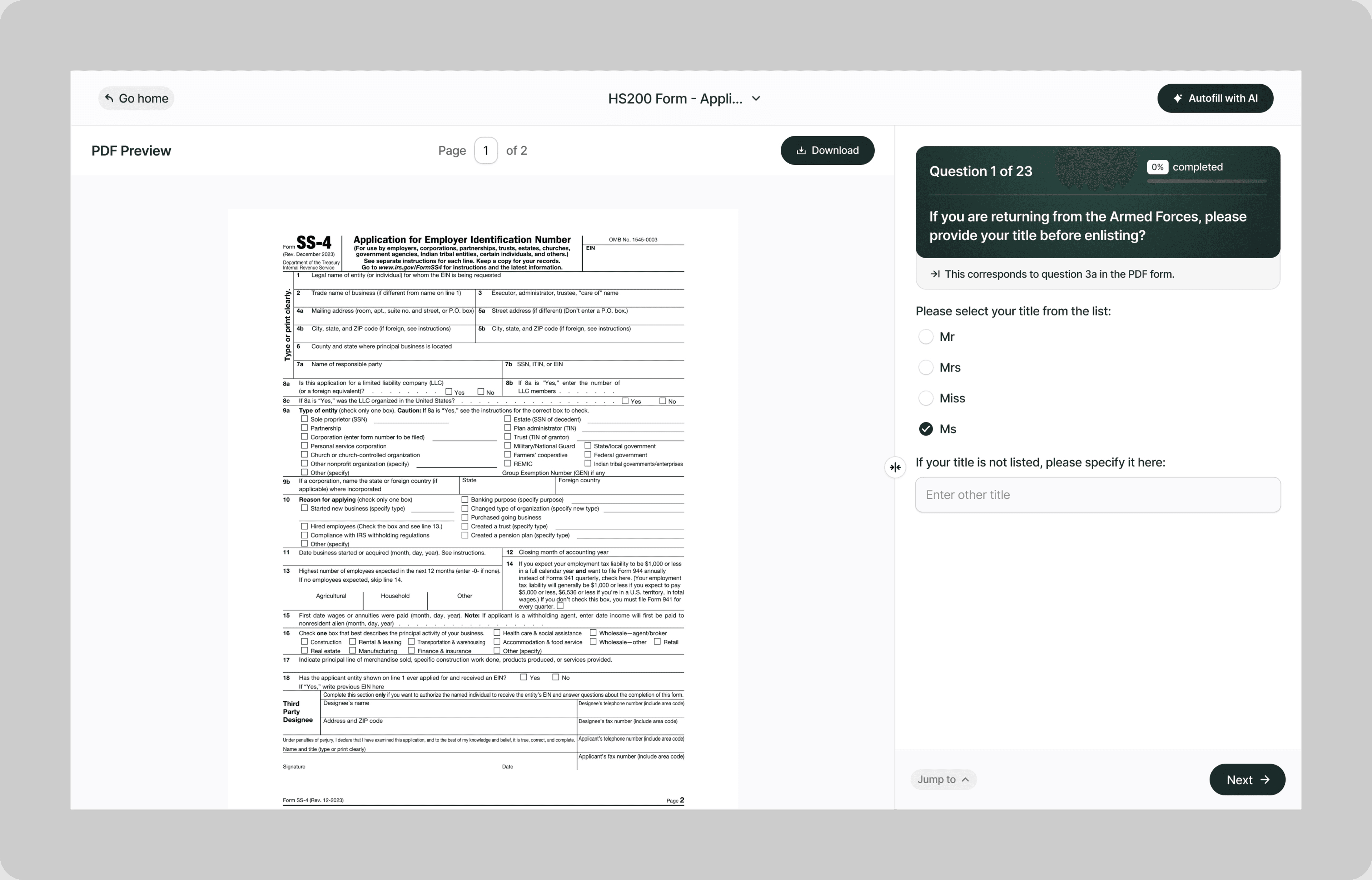
Instead of decoding insurance terminology, hunting for policy numbers across multiple documents, and second-guessing every field, our AI reads your forms and completes them for you, accurately and automatically.
Whether you're filing an auto claim, submitting a health insurance reimbursement, reporting property damage, applying for life insurance, or disputing a denied claim, Simplicity AI handles the paperwork so you can focus on getting your claim resolved.
The Problem with Insurance Forms
- Insurance forms are built for adjusters, not the people filling them out:
- Different carriers use different layouts for the same information
- Fields reference policy codes, coverage classes, and claim categories with no explanation
- A single claim event can require multiple forms with overlapping but slightly different fields
- One inconsistency between forms can stall your entire claim
Every rejected or delayed form means more time without the coverage or reimbursement you're owed. Simplicity AI eliminates these bottlenecks by converting any insurance form into a guided, plain-English experience.
How Simplicity AI Solves It
- With Simplicity AI, the form is the easy part of the claims process. Our AI:
- Recognizes insurance form structures across auto, health, property, life, and liability lines
- Pulls policyholder details, claim numbers, and dates from uploaded source documents
- Routes your answers to the correct fields regardless of carrier or form version
- Validates every entry for completeness, formatting, and cross-section consistency
- Catches errors and missing information before the insurance company does
You deal with your claim. We deal with the paperwork.
How to Fill Out Insurance Forms Online Using Simplicity AI
1
Upload your insurance form PDF to Simplicity AI. The AI scans the document, identifies every field from policyholder details through claim amounts and authorization signatures, and converts it into a guided questionnaire.
2
Enter your personal and policy information: name, policy number, group number, date of birth, and contact details. If you've used Simplicity AI before, your details carry over automatically.
3
Enter your claim details: date of loss, incident type, description, and itemized amounts. Upload supporting documents like police reports, medical records, or repair estimates as source files, and AI pulls relevant data into the correct fields.
4
Complete any supplemental sections required by the form, including additional insured parties, witness statements, provider information, and property schedules. AI shows only the sections relevant to your claim type.
5
Review the entire form. AI flags missing fields, formatting errors, and inconsistencies between sections before you export.
6
Sign electronically and download your completed form as a clean PDF ready to submit to your insurer.
Key Benefits of Using Simplicity AI to Fill Insurance Forms

Save Time and Effort
Complete multi-page insurance forms in minutes, not hours. No more cross-referencing policy documents or retyping the same details across multiple claim forms.

Reduce Errors
Catch missing fields, wrong policy numbers, and date inconsistencies before you submit. Clean forms get processed. Incomplete forms get sent back.

Improve Approval Speed
Submit well-prepared, error-free claims that adjusters can process without follow-up requests. The fewer questions your form raises, the faster your claim moves.

Stay Organized
Keep your policy documents, claim forms, supporting evidence, and correspondence in one secure workspace. No more searching through emails, filing cabinets, or phone screenshots for the document your adjuster needs.
Start Filling Forms the Smart Way
Stop losing time to complex insurance paperwork. With Simplicity AI, you can complete insurance claims and other important forms quickly, accurately, and confidently, every time. Try Simplicity AI today and experience stress-free form-filling.
FAQs
Frequently Asked Questions About Filling Insurance Forms with AI
What types of insurance forms can I fill out with Simplicity AI?
Simplicity AI works with any insurance form in PDF format. This includes auto claims, health insurance claims, property and casualty claims, life insurance applications, disability claims, workers' compensation forms, general liability claims, professional liability forms, and reimbursement requests. Upload the PDF, and AI converts it into a guided questionnaire regardless of carrier or form type.
How do I fill out an insurance form online for free?
Upload your insurance form PDF to Simplicity AI. Our platform converts the form into an interactive questionnaire that walks you through each section in plain English. Simply visit our website, upload your form, and follow the prompts to complete it in minutes. Try it for free.
Will AI fill in my policy number and personal details automatically?
Yes. Upload your insurance policy, a prior claim form, or any document containing your policyholder details as a source file. Simplicity AI extracts your name, policy number, group number, date of birth, and contact information, and automatically populates the correct fields.
Can I upload supporting documents like police reports or medical records?
Yes. Upload any supporting documents as source files, including police reports, medical records, repair estimates, photographs, explanation of benefits statements, and prior claim forms. Simplicity AI reads these documents and populates the relevant fields on your insurance form.
How does AI reduce errors on insurance forms?
Before you export, Simplicity AI scans every field for missing information, formatting errors, date inconsistencies, and mismatches between sections. If your date of loss doesn't align across forms, if a required field is blank, or if a claim amount appears to exceed coverage limits, AI flags it before you submit.
Can insurance professionals use Simplicity AI for bulk form processing?
Yes. Agents, brokers, adjusters, and claims processors handling high volumes can upload source documents once and auto-fill across multiple forms and carriers. Simplicity AI maps the same data to different form layouts, reducing processing time per claim and minimizing errors across your book of business.
Is my data safe when filling out insurance forms on Simplicity AI?
Yes. Insurance forms contain sensitive information, including policy numbers, Social Security numbers, medical details, financial data, and claim histories. Simplicity AI encrypts all documents, handles your data privately, and never shares it with third parties. Your data stays yours.
Common Mistakes When Filling Out Insurance Forms (and How AI Prevents Them)
Submitting with Missing or Blank Required Fields
The most common reason claims get returned. Insurance forms can have 30 or more required fields across multiple pages, and even one blank field can cause an adjuster to pause processing and request additional information. Simplicity AI scans every field before export and flags any empty fields.
Wrong Policy Number or Group Number
Your policy number, group number, certificate number, and claim number are distinct fields. Entering your group number instead of your policy number delays processing because the insurer's system can't match your claim to your coverage. Simplicity AI labels each field in plain English, so you know exactly which number goes where.
Inconsistent Dates Across Forms
Your claim form says March 15. Your supplemental statement says March 16. Your police report says March 14. Three different dates for the same incident trigger a review or a fraud flag. Simplicity AI cross-checks dates across all sections of the form and flags inconsistencies before export.
Vague or Incomplete Incident Descriptions
"Car accident on highway" doesn't give the adjuster enough to process your claim. They need location, time, weather, sequence of events, other parties, injuries, and property damage. A thin description means a follow-up request that adds weeks to your timeline. Simplicity AI prompts you with specific questions so your description is detailed enough on the first submission.
Not Attaching Required Supporting Documents
Many claims require police reports, medical records, repair estimates, death certificates, or other supporting evidence. Submitting the form without attachments doesn't expedite the process. It puts your claim on hold until the documents arrive. Simplicity AI generates a document checklist based on your claim type so you know what to attach before you submit.
Claiming Amounts That Exceed Coverage Limits
If your policy covers $50,000 and you submit a claim for $75,000, the overage gets denied, and the entire claim may be flagged for review. Simplicity AI flags claim amounts that appear to exceed standard coverage thresholds so you can adjust or prepare supporting documentation before submission.
Using an Outdated Form Version
Carriers update claim forms periodically. Submitting an outdated version may be rejected because the insurer's system expects fields that are not present in your version. Always upload the most current form to Simplicity AI.
Filing After the Claim Deadline
Every policy has a filing window after a loss event, typically 30 days to one year. Miss that window, and the insurer can deny your claim regardless of validity. Simplicity AI helps you complete and export the form the same day, so the paperwork isn't the reason you miss the deadline.

Job application AI form filler
Popular Forms
Popular forms ready for you to fill Instantly
Find commonly used government, legal, and official documents, already optimized for fast, stress-free filling with Simplicity AI. We've made them easier, smarter, and faster so you can move on with your day.
Tax Forms
Immigration Forms
Healthcare Forms
Employment Forms
Legal Forms
Motor Vehicle Forms
Experience instant PDF form filling with AI
Developers
